日常使用-Mac

常用软件

  1. Go2Shell – 访达里当前位置打开终端
  2. iTerm2 + zsh + Oh My Zsh – 终端
  3. iStat Menus – 系统状态监控
  1. Stats – 系统状态监控
  2. Maccy - 剪切板工具,类似Ubuntu的Clipboard Indicator
  3. Snipaste - 剪切板工具,带pin
  4. AltTab - 同Windows AltTab,支持同应用间切换
  5. Rectangle - 窗口最大化/在屏幕间移动窗口

配置

配置ssh

1
ssh-keygen -t ed25519 -C "shichenegyx@sina.com"

配置vim

~/.vimrc

1
2
3
4
5
6
7
8
9
10
11
syntax on           " 语法高亮
set nu " 显示行号
set tabstop=4 " Tab 缩进为 4 个空格
set shiftwidth=4 " 自动缩进为 4 个空格
set expandtab " 将 Tab 自动转化为空格
set nobackup " 覆盖文件时不备份
set cursorline " 突出显示当前行
set ruler " 在右下角显示光标位置
set autoindent " 自动缩进
set mouse=a " 允许鼠标点击
set hls " 高亮搜索结果

配置GIT

1
2
git config --global user.email "shichengyx@sina.com"
git config --global user.name "kivi"

系统设置|触控板

1 光标与点按:开启轻点来点按
2 滚动缩放:关闭自然滚动

系统设置|桌面与程序坞

1 打开将窗口最小化至应用程序图标
2 在台前调度中显示最近使用的App设置为仅在台前调度中
3 关闭在程序坞中显示建议App和最近使用的App

配置键盘Home/End键

1 创建默认的按键映射文件

1
2
mkdir -p ~/Library/KeyBindings
vim ~/Library/KeyBindings/DefaultKeyBinding.dict

2 写入映射内容

1
2
3
4
5
6
7
8
9
10
11
12
13
14
15
16
17
18
19
{
/* Remap Home/End keys */
/* Home Button*/
"\UF729" = "moveToBeginningOfLine:";
/* End Button */
"\UF72B" = "moveToEndOfLine:";
/* Shift + Home Button */
"$\UF729" = "moveToBeginningOfLineAndModifySelection:";
/* Shift + End Button */
"$\UF72B" = "moveToEndOfLineAndModifySelection:";
/* Ctrl + Home Button */
"^\UF729" = "moveToBeginningOfDocument:";
/* Ctrl + End Button */
"^\UF72B" = "moveToEndOfDocument:";
/* Shift + Ctrl + Home Button */
"$^\UF729" = "moveToBeginningOfDocumentAndModifySelection:";
/* Shift + Ctrl + End Button*/
"$^\UF72B" = "moveToEndOfDocumentAndModifySelection:";
}

3 重启电脑后生效

配置Snipaste

1 常规:启用“开机启动”
2 输出:配置路径:/Users/wangqiwei/Pictures/Snapshot/Snipaste_$yyyy-MM-dd_HH-mm-ss$.png
3 控制:只设置截屏Ctrl + A

配置访达

1 标签栏:去除所有标签
2 边栏:显示图片,{HOME}

配置Stats

1 只保留CPU、MEM、网络
2 网络|小组件:标识改为箭头
3 打开合并模块,关闭合并详情

配置iTerm2 + zsh + oh my zsh

1 配置iTerm2:

  • Profiles|Colors,Default背景色设置为黑色,前景色设置为白色。Cursor背景色设置为白色,前景色设置为黑色。
  • Closing,关闭`Confirm “Quite iTerm2 (⌘Q)”

2 配置zsh:~/.zshrc,末尾增加

1
source ~/.zshrc_user

3 配置oh my zsh,安装插件

1
2
3
4
5
6
7
8
9
10
11
brew install zsh-syntax-highlighting
echo "source $(brew --prefix)/share/zsh-syntax-highlighting/zsh-syntax-highlighting.zsh" >> ~/.zshrc_user
source ~/.zshrc

brew install zsh-autosuggestions
echo "source $(brew --prefix)/share/zsh-autosuggestions/zsh-autosuggestions.zsh" >> ~/.zshrc_user
source ~/.zshrc

brew install autojump
echo "[ -f /opt/homebrew/etc/profile.d/autojump.sh ] && . /opt/homebrew/etc/profile.d/autojump.sh" >> ~/.zshrc_user
source ~/.zshrc

配置go2shell

配置terminal为iTerm2

常见问题

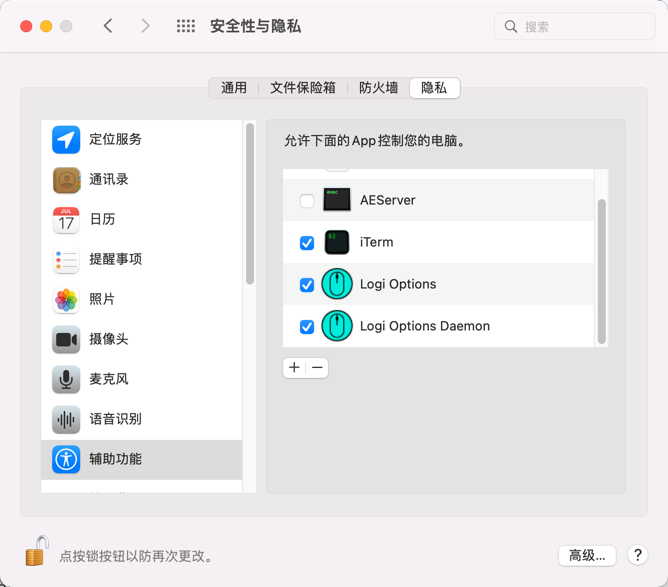
罗技鼠标滚轮失灵

  • 位置:系统偏好设置|安全性与隐私|隐私|辅助功能
  • 操作:针对逻辑驱动,未勾选的进行勾选,已勾选的取消再重新勾选。

img.png

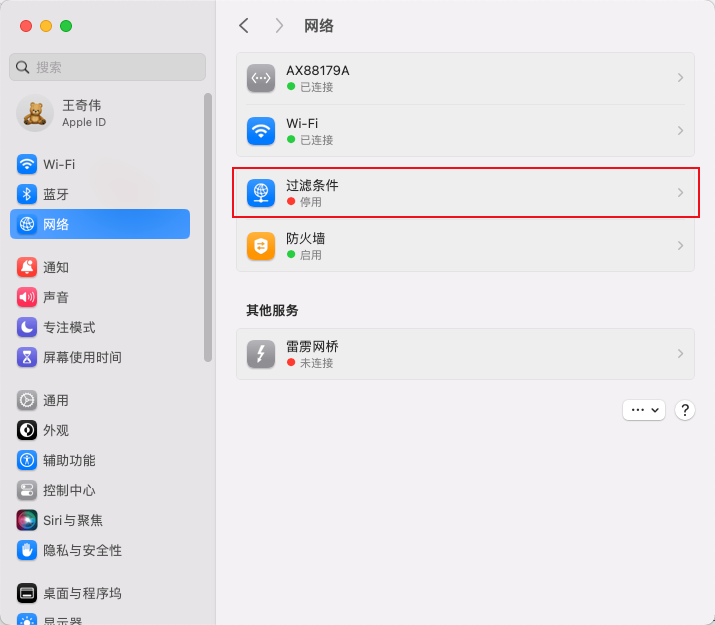
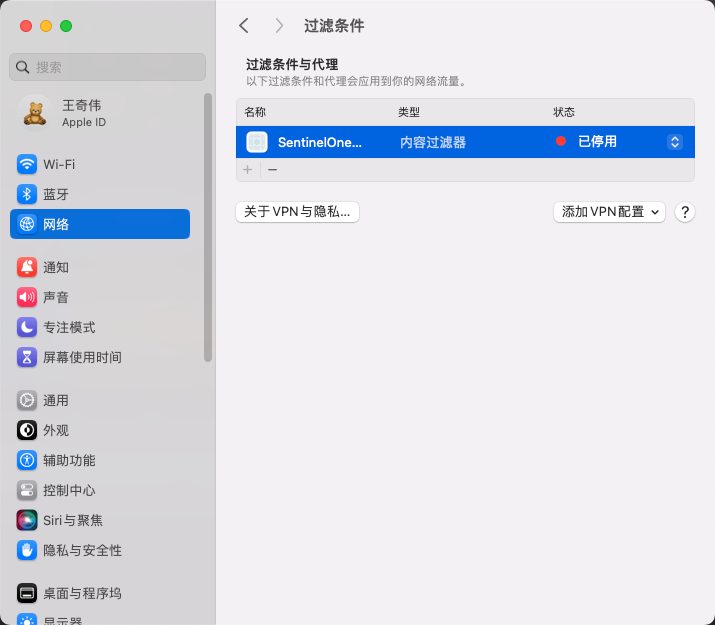
SentinelOne卸载后,无法联网

删除方法

系统设置 | 网络 | 过滤条件 -> 停用SentinelOne并删除

网络设置.png
网络设置2.png

Ctrl + w失灵无法关闭浏览器标签

  • 重新插拔键盘

外接显示器接的键盘失灵

https://github.com/xxxzc/xps15-9570-macos/issues/58

尝试以下步骤:

1)更新已有的必要更新,重启Mac

2)重启后若仍失灵,则直接操作Mac电脑,锁屏再解锁。然后观测是否恢复

评论