sshuttle使用
一、使用命令
执行sudo sshuttle -l 8888 123.232.110.116/32 -r root@10.170.223.247
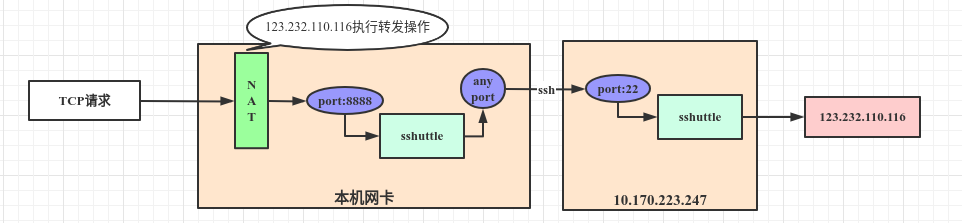
二、查看结果:
查看NAT
sudo iptables --list -t nat1
2
3
4Chain PREROUTING (policy ACCEPT)
target prot opt source destination
sshuttle-8888 all -- anywhere anywhere
DOCKER all -- anywhere anywhere ADDRTYPE match dst-type LOCAL
Chain INPUT (policy ACCEPT)
target prot opt source destination
Chain OUTPUT (policy ACCEPT)
target prot opt source destination
sshuttle-8888 all – anywhere anywhere
DOCKER all – anywhere !localhost/8 ADDRTYPE match dst-type LOCAL
Chain POSTROUTING (policy ACCEPT)
target prot opt source destination
MASQUERADE all – 172.17.0.0/16 anywhere
MASQUERADE all – 172.19.0.0/16 anywhere
MASQUERADE tcp – 172.19.0.2 172.19.0.2 tcp dpt:mysql
Chain DOCKER (2 references)
target prot opt source destination
RETURN all – anywhere anywhere
RETURN all – anywhere anywhere
DNAT tcp – anywhere anywhere tcp dpt:mysql to:172.19.0.2:3306
Chain sshuttle-8888 (2 references)
target prot opt source destination
RETURN tcp – anywhere https://account.jetbrains.com:443
REDIRECT tcp – anywhere 123.232.110.116 TTL match TTL != 42 redir ports 8888
1 | 2. 查看端口监听`netstat -np | grep 10.170.223.247` |